Une fois les données nettoyées (dans le cas de tweets par exemple, retrait de caractères spéciaux, emojis, retours de chariot, tabulations, etc.), la modélisation thématique LDA à l’aide du module Gensim (Python) s’effectue par les 6 étapes suivantes:
- Chargement des modules nécessaires (si ce n’est pas déjà fait)
- Importation des données (si ce n’est pas déjà fait)
- Pré-traitement des données (tokenization, lemmatization, stopwords)
- Bag-of-words
- Construction du modèle LDA
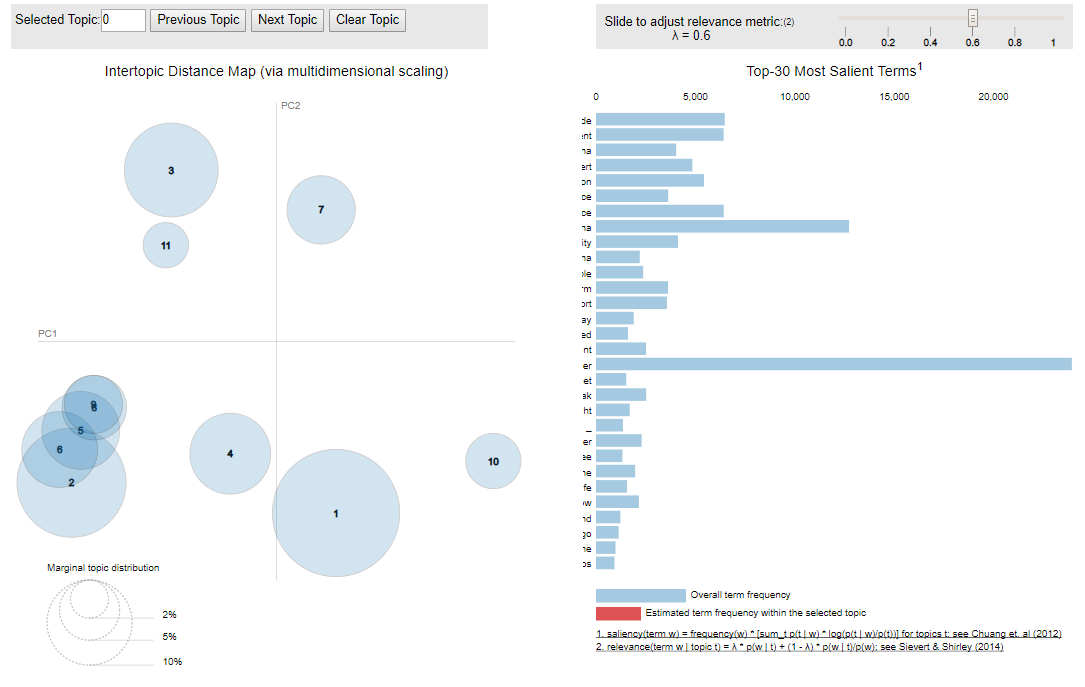
- Visualier le modèle avec pyLDAvis
1. Chargement des modules
[cc lang=”python”]
# S’assurer d’avoir le modèle spacy pour le text pre-processing
# Rouler les commandes suivantes dans un terminal au besoin
#pip install -U spacy
#py -m spacy download en
#py -m spacy download fr
#pip install pyLDAvis
#pip install -U textblob
#py -m textblob.download_corpora
# Importer packages re, gensim, spacy et pyLDAvis, ainsi que matplotlib, numpy et pandas pour la gestion des données et les visualisations graphiques
import os
import time
import json
import csv
import re
import re, string
import numpy as np
import pandas as pd
from pandas.io.json import json_normalize
from nltk.tokenize import TweetTokenizer
from pprint import pprint
# Gensim
import gensim
import gensim.corpora as corpora
from gensim.utils import simple_preprocess
from gensim.models import CoherenceModel
# spacy pour lemmatization
import spacy
# Importer la liste de stopword NLTK
import nltk; nltk.download(‘stopwords’); nltk.download(“words”)
from nltk.corpus import wordnet
from nltk.corpus import stopwords
stop_words = stopwords.words(‘english’)
# Ajouter certains stopwords en fonction du corpus de données si nécessaire
# stop_words.extend([‘from’, ‘subject’, ‘re’, ‘edu’, ‘use’, ‘nan’, ‘rt’])
# Plotting tools
import pyLDAvis
import pyLDAvis.gensim
import matplotlib.pyplot as pltfrom nltk.tokenize import TweetTokenizer
from nltk.corpus import stopwords
import re, string
import nltk
from nltk.collocations import *
from sklearn.feature_extraction.text import TfidfVectorizer
from sklearn.cluster import KMeans
from gensim import corpora, models
from nltk.stem.wordnet import WordNetLemmatizer
import string[/cc]
2. Importation des données
[cc lang=”python”]
myfile = #insérer le lien vers le fichier JSON
data = pd.read_json(myfile, lines=True)
df = pd.DataFrame(data)
# Convertir la variable à analyser en liste (dans ce cas-ci : text_clean )
data = df.text_clean.values.tolist()[/cc]
3. Pré-traitement des données
[cc lang=”python”]
#tokenization
def sent_to_words(sentences):
for sentence in sentences:
yield(gensim.utils.simple_preprocess(str(sentence), deacc=True)) # deacc=True removes punctuations
data_words = list(sent_to_words(data))
# création de bigram et trigram pour analyse ultérieures
# Build the bigram and trigram models
bigram = gensim.models.Phrases(data_words, min_count=5, threshold=100) # higher threshold fewer phrases.
trigram = gensim.models.Phrases(bigram[data_words], threshold=100)
# Faster way to get a sentence clubbed as a trigram/bigram
bigram_mod = gensim.models.phrases.Phraser(bigram)
trigram_mod = gensim.models.phrases.Phraser(trigram)
# Définir les fonctions pour les stopwords, bigrams et lemmatization
def remove_stopwords(texts):
return [[word for word in simple_preprocess(str(doc)) if word not in stop_words] for doc in texts]
def make_bigrams(texts):
return [bigram_mod[doc] for doc in texts]
def lemmatization(texts, allowed_postags=[‘NOUN’, ‘ADJ’, ‘VERB’, ‘ADV’]):
“””https://spacy.io/api/annotation (https://spacy.io/api/annotation)”””
texts_out = []
for sent in texts:
doc = nlp(” “.join(sent))
texts_out.append([token.lemma_ for token in doc if token.pos_ in allowed_postags])
return texts_out
# Retirer les Stopwords
data_words_nostops = remove_stopwords(data_words)
# Créer les bigrams
data_words_bigrams = make_bigrams(data_words_nostops)
# S’assurer que spacy utilise la langue approprié pour le corpus (dans ce cas-ci l’anglais)
# Télécharger la langue au besoin avec cette commande dans un terminal
# python3 -m spacy download en
nlp = spacy.load(‘en’, disable=[‘parser’, ‘ner’])
# Lemmatization (permet de ne conserver que les noms, adj, verbes et adverbes)
data_lemmatized = lemmatization(data_words_bigrams, allowed_postags=[‘NOUN’, ‘ADJ’, ‘VERB’, ‘ADV’])
[/cc]
4. Bag-of-words
[cc lang=”python”]
# Créer le dictionnaire
id2word = corpora.Dictionary(data_lemmatized)
# Créer le corpus
texts = data_lemmatized
corpus = [id2word.doc2bow(text) for text in texts][/cc]
5. Construction du modèle LDA
Dans cet exemple, le nombre de topics est réglé à 5, mais cela varie en fonction du corpus. Vous trouverez plus de détails ici sur comment connaître le nombre optimal de topics.
[cc lang=”python”]
# Construire le modèle LDA
lda_model = gensim.models.ldamodel.LdaModel(corpus=corpus, id2word=id2word, num_topics=5, random_state=1, update_every=1, chunksize=100, passes=10, alpha=’auto’, per_word_topics=True)
# Afficher le Perplexity score
print(‘\nPerplexity: ‘, lda_model.log_perplexity(corpus)) # a measure of how good the model is. lower the better.
#Afficher le Coherence Score
coherence_model_lda = CoherenceModel(model=lda_model, texts=data_lemmatized, dictionary=id2word, coherence=’c_v’)
coherence_lda = coherence_model_lda.get_coherence()
print(‘\nCoherence Score: ‘, coherence_lda)[/cc]
6. Visualiser le modèle avec pyLDAvis
[cc lang=”python”]
pyLDAvis.enable_notebook()
vis = pyLDAvis.gensim.prepare(lda_model, corpus, id2word)
vis[/cc]
Au final, vous obtiendrez un graphique interactif comme celui-ci :